
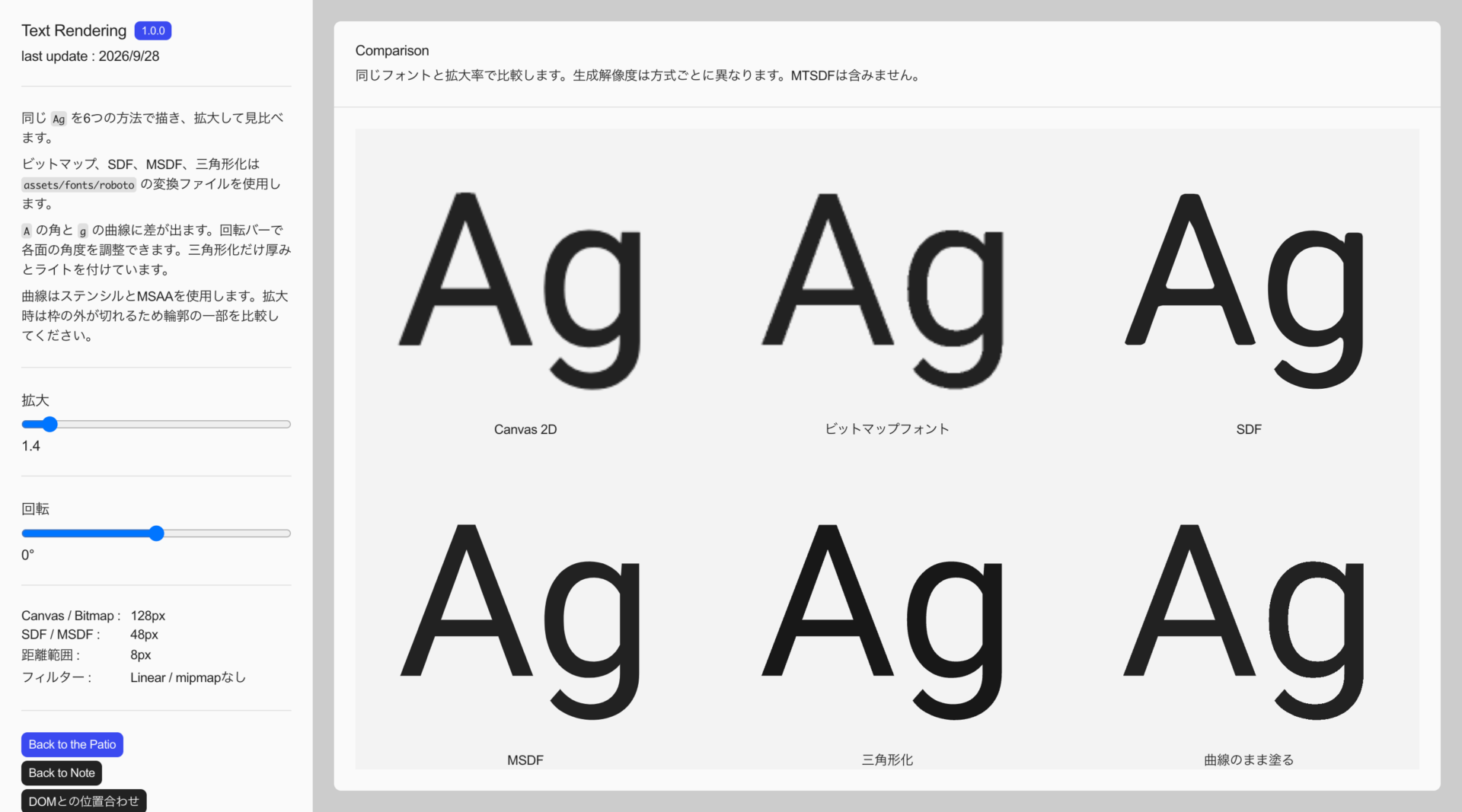
This note summarizes ways to render text in WebGL. The methods fall into three categories: baking glyphs into textures, converting them into triangles, and filling them directly from curves. The following table lists the rendering methods and suitable uses.
| Method | Suitable uses |
|---|---|
| Canvas Texture | Short headings |
| Bitmap fonts | Text displayed at a fixed size |
| SDF | Flat text that needs to scale up |
| MSDF / MTSDF | Flat text that preserves corners |
| Triangulation | Short headings and 3D logos |
| Filling directly from curves | Text that scales up while keeping curved outlines |
Canvas Texture
Draw text with fillText(), turn it into a CanvasTexture, and apply it to a plane. When using a web font, you need to wait for it to load before drawing.
const face = new FontFace( 'FontName', 'url(/fonts/FontName.woff)' );
await face.load();
document.fonts.add( face );

const canvas = document.createElement( 'canvas' );
canvas.width = 512;
canvas.height = 128;

const context = canvas.getContext( '2d' );
context.clearRect( 0, 0, canvas.width, canvas.height );
context.fillStyle = '#ffffff';
context.font = '64px FontName, sans-serif';
context.textBaseline = 'middle';
context.fillText( 'Ag', 24, canvas.height / 2 );

const texture = new THREE.CanvasTexture( canvas );
texture.colorSpace = THREE.SRGBColorSpace;

const material = new THREE.MeshBasicMaterial( {
	map: texture,
	transparent: true
} );
This is relatively simple if you only need to draw a short heading once. Since the result is an image, it becomes blurry when enlarged. There is no automatic line wrapping either, so longer text needs separate logic for line breaks and layout.
Bitmap Fonts
Character shapes (glyphs) are packed into a single image in advance and applied to a plane for each character. The following files are needed.
| File | Contents |
|---|---|
| FontName.otf | Font |
| charset.txt | Characters to include |
| FontName.fnt | Layout information |
| FontName.png | Glyph images |
Generation
Use fontbm to generate the files. Executables are available under Releases.
fontbm \
	--font-file FontName.otf \
	--output FontName \
	--font-size 64 \
	--chars-file charset.txt \
	--data-format json \
	--texture-name-suffix none
Write the characters you want to include in charset.txt. --font-size 64 sets the generation size to 64px, and --data-format json outputs the layout information as JSON. The output files are FontName.fnt and FontName.png.
Rendering
Arrange the characters using the positions and widths in the JSON. The following example uses one atlas and a single horizontal line, omitting letter-spacing adjustments and line breaks.
const text = 'Ag';

// Loading
const jsonUrl = 'fonts/FontName.fnt';
const response = await fetch( jsonUrl );
if ( !response.ok ) throw new Error( jsonUrl );
const data = await response.json();
const directory = jsonUrl.slice( 0, jsonUrl.lastIndexOf( '/' ) + 1 );
const texture = await new THREE.TextureLoader().loadAsync( directory + data.pages[ 0 ] );
texture.colorSpace = THREE.SRGBColorSpace;

// Material
const material = new THREE.MeshBasicMaterial( {
	map: texture,
	transparent: true,
	depthWrite: false
} );

// BMFont layout. Also reused in the MSDF example.
function createTextGroup( text, data, material ) {
	const scale = 1 / data.info.size;
	const common = data.common;
	const group = new THREE.Group();
	let cursor = 0;
	for ( const char of text ) {
		const glyph = data.chars.find( ( item ) => item.id === char.codePointAt( 0 ) );
		const width = glyph.width * scale;
		const height = glyph.height * scale;
		const x = glyph.xoffset * scale;
		const y = ( common.base - glyph.yoffset - glyph.height / 2 ) * scale;
		const geometry = new THREE.PlaneGeometry( width, height );
		geometry.translate( x + width / 2, y, 0 );
		const u0 = glyph.x / common.scaleW;
		const u1 = ( glyph.x + glyph.width ) / common.scaleW;
		const v0 = 1 - ( glyph.y + glyph.height ) / common.scaleH;
		const v1 = 1 - glyph.y / common.scaleH;
		const uv = geometry.attributes.uv;
		uv.setXY( 0, u0, v1 );
		uv.setXY( 1, u1, v1 );
		uv.setXY( 2, u0, v0 );
		uv.setXY( 3, u1, v0 );
		const mesh = new THREE.Mesh( geometry, material );
		mesh.position.x = cursor;
		group.add( mesh );
		cursor += glyph.xadvance * scale;
	}
	return group;
}

const textGroup = createTextGroup( text, data, material );
scene.add( textGroup );
The advantage is that the image and layout information can be reused. However, the result does not scale up well, and adding characters that are not included requires regenerating the image. Rendering large amounts of text also calls for combining meshes.
SDF
SDF (Signed Distance Field) stores distances to the outline in one texture channel, then reconstructs the edges in a shader. The following file is needed.
| File | Contents |
|---|---|
| FontName.woff | Font (.ttf / .otf / .woff) |
With Three.js, you can use troika-three-text. It generates SDFs for the required characters from a font and handles layout, including kerning and line breaks.
import { Text } from 'troika-three-text';
const myText = new Text();
myText.text = 'Hello world!';
myText.font = '/fonts/FontName.woff';
myText.fontSize = 0.2;
myText.color = 0xffffff;
scene.add( myText );
myText.sync();
With this method, outlines hold up well when enlarged, although corners can become rounded at low resolutions. If details break down, increase sdfGlyphSize from the default of 64 to 128.
MSDF / MTSDF
This is the method I use most often. MSDF (Multi-channel Signed Distance Field) distributes distances across the three RGB channels to preserve corners when enlarged. The following files are needed.
| File | Contents |
|---|---|
| FontName.otf | Font |
| charset.txt | Characters to include |
| FontName.json | Layout information |
| FontName.0.png, etc. | Distance images (one per page) |
Generation
Use msdf-bmfont-xml to generate the files. It uses msdfgen internally.
yarn global add msdf-bmfont-xml
msdf-bmfont \
	-f json \
	--texture-size 1024,1024 \
	--distance-range 8 \
	--pot \
	--smart-size \
	--charset-file charset.txt \
	-o FontName \
	FontName.otf
As with bitmap fonts, write the characters you want to include in charset.txt.
-f json outputs layout information as JSON. --texture-size sets the maximum image dimensions, while --pot and --smart-size adjust the image dimensions. --distance-range 8 specifies the full width of the stored distance range; use the same value in the shader.
Rendering
Reuse createTextGroup() from the Bitmap Fonts section for layout and change the material. Since the atlas contains distances rather than colors, set it to NoColorSpace and reconstruct the outline from the median of the RGB values. This example also assumes a single atlas.
const text = 'Ag';

// Loading
const jsonUrl = 'fonts/FontName.json';
const response = await fetch( jsonUrl );
if ( !response.ok ) throw new Error( jsonUrl );
const data = await response.json();
const directory = jsonUrl.slice( 0, jsonUrl.lastIndexOf( '/' ) + 1 );
const texture = await new THREE.TextureLoader().loadAsync( directory + data.pages[ 0 ] );
texture.colorSpace = THREE.NoColorSpace;
texture.generateMipmaps = false;
texture.minFilter = THREE.LinearFilter;
texture.magFilter = THREE.LinearFilter;

// Material that reconstructs the outline from distances
const material = new THREE.ShaderMaterial( {
	glslVersion: THREE.GLSL3,
	uniforms: {
		tMap: { value: texture },
		uDistanceRange: { value: data.distanceField.distanceRange },
		uAtlasSize: { value: new THREE.Vector2( data.common.scaleW, data.common.scaleH ) },
		uInk: { value: new THREE.Color( 0x222222 ) }
	},
	vertexShader: /* glsl */`
		out vec2 vUv;
		void main() {
			vUv = uv;
			gl_Position = projectionMatrix * modelViewMatrix * vec4( position, 1.0 );
		}
	`,
	fragmentShader: /* glsl */`
		precision highp float;
		in vec2 vUv;
		out vec4 fragColor;
		uniform sampler2D tMap;
		uniform float uDistanceRange;
		uniform vec2 uAtlasSize;
		uniform vec3 uInk;
		float median( float r, float g, float b ) {
			return max( min( r, g ), min( max( r, g ), b ) );
		}
		void main() {
			vec3 sampleColor = texture( tMap, vUv ).rgb;
			float signedDistance = median( sampleColor.r, sampleColor.g, sampleColor.b );
			vec2 unitRange = vec2( uDistanceRange ) / uAtlasSize;
			vec2 screenTexSize = vec2( 1.0 ) / fwidth( vUv );
			float screenPxRange = max( 0.5 * dot( unitRange, screenTexSize ), 1.0 );
			float screenPxDistance = screenPxRange * ( signedDistance - 0.5 );
			float alpha = clamp( screenPxDistance + 0.5, 0.0, 1.0 );
			fragColor = linearToOutputTexel( vec4( uInk, alpha ) );
		}
	`,
	transparent: true,
	depthWrite: false
} );

const textGroup = createTextGroup( text, data, material );
scene.add( textGroup );
The advantage over SDF is that corners hold up better when enlarged. However, the resolution used during generation also affects thin lines and small gaps.
MTSDF adds a true distance field in the alpha channel to the RGB MSDF, making it useful for effects such as glows and rounded outlines. The code above and the demo use MSDF only.
Converting Outlines into Triangles
Use this approach when you want 3D text. The glyph outlines are converted into vertices, with thickness added if needed. The following files are needed.
| File | Contents |
|---|---|
| FontName.otf | Font |
| FontName.typeface.json | Glyph shapes |
Generation
Export FontName.typeface.json using facetype.js.
Rendering
In Three.js, use FontLoader and TextGeometry.
import { FontLoader } from 'three/addons/loaders/FontLoader.js';
import { TextGeometry } from 'three/addons/geometries/TextGeometry.js';
const loader = new FontLoader();
const font = await loader.loadAsync( 'fonts/FontName.typeface.json' );
const geometry = new TextGeometry( 'Logo', {
	font: font,
	size: 1,
	depth: 0.15,
	curveSegments: 8,
	bevelEnabled: false
} );
The advantage is that the text can be treated as a 3D object. However, the vertex count grows with the number of characters and the complexity of their outlines, so this is not suited to long text.
Filling with Curves
Bézier curve equations determine whether a point lies inside or outside the outline. No texture is needed, but outline data extracted from the font is required.
Loop and Blinn
Loop and Blinn's method is one approach for quadratic curves. Special coordinates are assigned to the vertices, and the sign of the following value determines whether a point is inside or outside.
float k = vCurve.x * vCurve.x - vCurve.y;The advantage is that curves do not need to be subdivided further when enlarged. However, the equation alone does not render text; preparing the outlines and vertices takes work.
Stencil
The stencil buffer records which regions to fill. The comparison demo combines it with curve tests to color only the inside of each glyph. In addition to handling curves, the implementation needs to manage filled regions and smooth their edges, making it somewhat complex.
Working with DOM Text
Rendering text in WebGL alone does not make it selectable, searchable, or readable by screen readers. Keep body text and headings in the DOM as well, and overlay WebGL text at the same position when needed.
The DOM alignment demo overlays the fixed text Ag. It reads the DOM position and text size, then follows the text as the page scrolls.
HTML-in-Canvas
HTML-in-Canvas is also being proposed as a way to draw elements styled and laid out with HTML/CSS directly into Canvas, or use them as WebGL or WebGPU textures. One intended use is to apply shader effects while leaving line wrapping and styling to the browser.
As of September 2026, it is experimental and enabled through a Chromium flag, but it also includes a mechanism for synchronizing the DOM with the rendered positions to handle text selection and input.
References
- troika-three-text
- fontbm
- msdf-bmfont-xml
- msdfgen
- msdf-atlas-gen
- Improved Alpha-Tested Magnification for Vector Textures and Special Effects (Valve's SDF approach, SIGGRAPH 2007)
- Rendering Vector Art on the GPU (Loop / Blinn, GPU Gems 3)
- ※ This article is an AI translation of the Japanese original.